
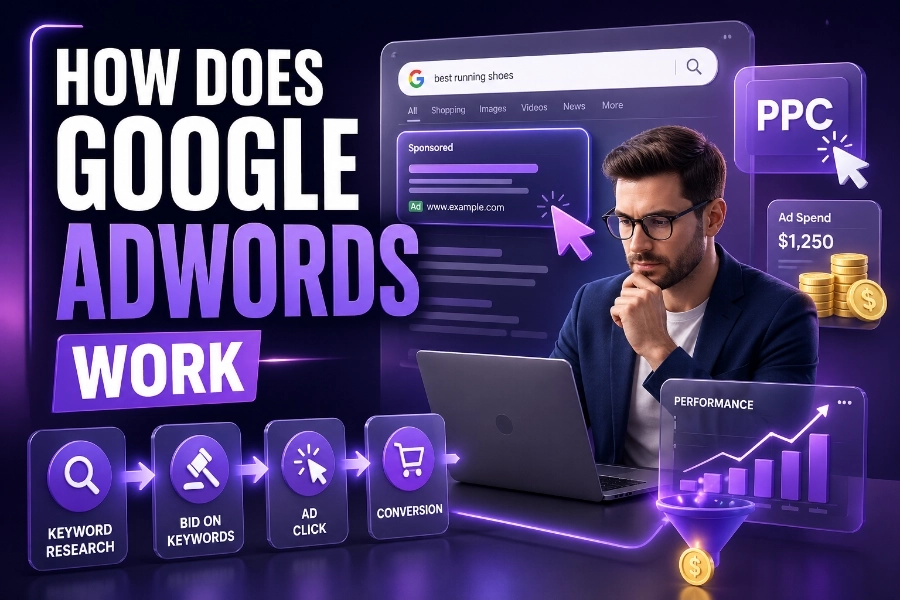
Google Ads is one of the most popular online advertising platforms, allowing businesses to display ads on Google’s search results and across the Google Display Network. As an advertiser, you can bid for placement in search results based on relevant keywords, paying only when someone clicks on your ad (pay-per-click or PPC).
In this article, we will dive into the process of how Google Ads works and how you can leverage its features to drive traffic and grow your business.
The Google Ads Auction Process
Google Ads operates through an auction system that determines the visibility and position of ads based on bids, keywords, and quality. When a user searches for something on Google, the search engine runs an auction to determine which ads to display.
In this auction, advertisers place bids on specific keywords. These keywords trigger ads to appear based on the search query. However, the amount you bid isn’t the only factor that matters. The quality of your ad also plays a critical role. Google assigns a Quality Score to every ad, which is based on the ad’s relevance, the user experience of the landing page, and the expected click-through rate (CTR).
This dynamic system ensures that ads are shown to users who are most likely to engage with them. In fact, you can increase your chances of appearing higher on the results page by focusing on keyword relevance and improving your ad copy quality.
Utilizing premium WordPress themes, PSD & HTML templates is an advanced optimization practices. And if you’re running ads, keep in mind that the more relevant your ads are to the audience, the better your chances of driving traffic to your website.
How Does Google Ads Help Businesses Reach the Right Audience?
Google Ads allows businesses to target specific audience segments based on various factors. By understanding how Google Ads works, you can reach customers based on their interests, location, and even the type of device they are using. This level of targeting ensures that your ads reach the most relevant audience.
Advertisers can set up targeting for their campaigns in multiple ways, including by geographic location, language preferences, and device types (desktop, mobile, tablet). Google Ads also supports remarketing, allowing you to target users who have previously interacted with your website. Remarketing helps businesses stay top of mind with potential customers and encourages them to return to your site.
The advanced targeting capabilities provided by Google Ads can significantly enhance the return on investment (ROI) for your campaigns. Understanding how targeting works and how you can refine your campaigns can set you apart. You can also explore how to edit header in WordPress.
Google Ads Bidding Strategies and Budget Management
When it comes to Google Ads, setting up the right bidding strategy is key to controlling your budget and getting the best possible results. Google Ads offers several bidding strategies, including:
- Cost-per-click (CPC): You pay each time a user clicks on your ad.
- Cost-per-thousand-impressions (CPM): You pay for every 1,000 views of your ad.
- Cost-per-acquisition (CPA): You pay only when a user completes a desired action, such as making a purchase or filling out a form.
Choosing the right bidding strategy depends on your goals. If you’re looking to increase website visits, a CPC strategy might be ideal. For campaigns focused on brand awareness, CPM bidding might be more effective. Meanwhile, CPA is the best option if your goal is to drive conversions.
Proper budget management is also crucial in ensuring that your campaigns don’t overspend. You can set daily or campaign-level budgets to control your ad spend. Additionally, Google Ads allows you to adjust bids depending on time of day, location, and device, giving you even more control over how your budget is allocated.
Understand how to duplicate a page in WordPress and manage your site effectively. These strategies can set you apart.
Creating High-Quality Google Ads Campaigns
Building a successful Google Ads campaign requires more than just placing a bid. It’s essential to create well-targeted, high-quality ads that attract attention and compel users to click. One of the most important aspects of creating effective Google Ads is crafting ad copy that resonates with your audience.
Your ad text should be clear, relevant, and engaging. It should highlight the unique selling points of your product or service while addressing the needs and pain points of your target audience. Additionally, you should create compelling call-to-action (CTA) phrases, such as “Get Started Now” or “Learn More,” to encourage users to take action.
Optimizing your landing pages is equally important. Once a user clicks on your ad, they should be directed to a page that is closely related to the ad they clicked. This increases the chances of conversion and improves your Quality Score in Google Ads.
Additionally, it’s crucial to test your ads regularly to find out what works best. A/B testing allows you to compare different versions of your ads and determine which one performs better.
The Role of Analytics and Tracking in Google Ads
Analytics and tracking are vital to measuring the performance of your campaigns and determining ROI. Google Ads offers several built-in analytics tools, such as Google Analytics, which can help you track metrics like conversion rates, click-through rates, and bounce rates.
By monitoring these metrics, you can fine-tune your campaigns and identify areas for improvement. For example, if you notice that a particular ad is performing well, you can increase your budget for that ad to maximize its reach. On the other hand, if an ad is underperforming, you can pause it and focus your budget on more successful campaigns.
Using Google Tag Manager and Google Ads Conversion Tracking, you can also track specific actions on your website, such as purchases or form submissions. This allows you to directly measure the effectiveness of your Google Ads campaigns in generating valuable conversions.
Conclusion:
Understanding how Google Ads works and how to use it effectively can dramatically boost your business’s visibility and sales. By bidding on relevant keywords, crafting high-quality ads, and strategically targeting the right audience, you can create campaigns that drive significant traffic to your website.
As we’ve explored in this article, the success of your Google Ads campaigns depends on factors such as bid strategies, ad relevance, and ongoing optimization. The tools and strategies provided by Google Ads allow businesses of all sizes to grow their online presence, increase conversions, and achieve a measurable ROI.
By mastering the basics of how Google Ads works, you can elevate your online marketing efforts and take your business to new heights. With the right approach, Google Ads can become a cornerstone of your digital marketing strategy.
FAQs
How does Google Ads work?
Google Ads operates through a bidding system where advertisers bid for keywords related to their business. Ads are shown based on relevance, quality score, and the bid amount. Advertisers only pay when users click their ad (pay-per-click or PPC).
What is a Quality Score in Google Ads?
Quality Score is a metric used by Google to determine the relevance of your ads and landing pages. It’s calculated based on factors like ad relevance, expected click-through rate, and user experience, impacting your ad rank and CPC.
How do I set a budget for my Google Ads campaign?
In Google Ads, you can set a daily budget to control spending. You can allocate a specific amount for your campaign and adjust bids for different time slots, locations, or devices, ensuring your budget is spent wisely.
What are the different types of Google Ads campaigns?
Google Ads offers several campaign types, including Search, Display, Shopping, and Video campaigns. Each type is suited for different goals, such as generating traffic, increasing sales, or raising brand awareness across various platforms and devices.
How can I improve my Google Ads performance?
To improve Google Ads performance, focus on targeting the right keywords, improving your ad copy, and optimizing landing pages. Regularly review analytics to adjust bids, budgets, and strategies, ensuring you’re reaching the most relevant audience effectively.
What is the difference between CPC and CPM in Google Ads?
Cost-per-click (CPC) charges advertisers when users click their ads, while cost-per-thousand impressions (CPM) charges for ad views regardless of clicks. CPC is ideal for traffic generation, while CPM is better suited for brand awareness campaigns.
How does Google Ads targeting work?
Google Ads targeting lets you refine your audience based on location, language, device, interests, and behavior. By using these targeting options, you can ensure that your ads reach the most relevant users, increasing the chances of conversion.
What is remarketing in Google Ads?
Remarketing in Google Ads allows you to target users who have previously visited your website. By showing relevant ads to these users as they browse other sites, you can re-engage potential customers and encourage them to complete a desired action.
What is the bidding system in Google Ads?
The bidding system in Google Ads is based on auctions where advertisers bid for keywords. The highest bid doesn’t always win, as factors like ad relevance, Quality Score, and user experience also determine which ads are shown and their placement.
How can I track conversions in Google Ads?
You can track conversions in Google Ads using conversion tracking. By setting up tracking codes on your website, you can monitor actions like purchases, sign-ups, or form submissions. This data helps measure the effectiveness of your campaigns.